
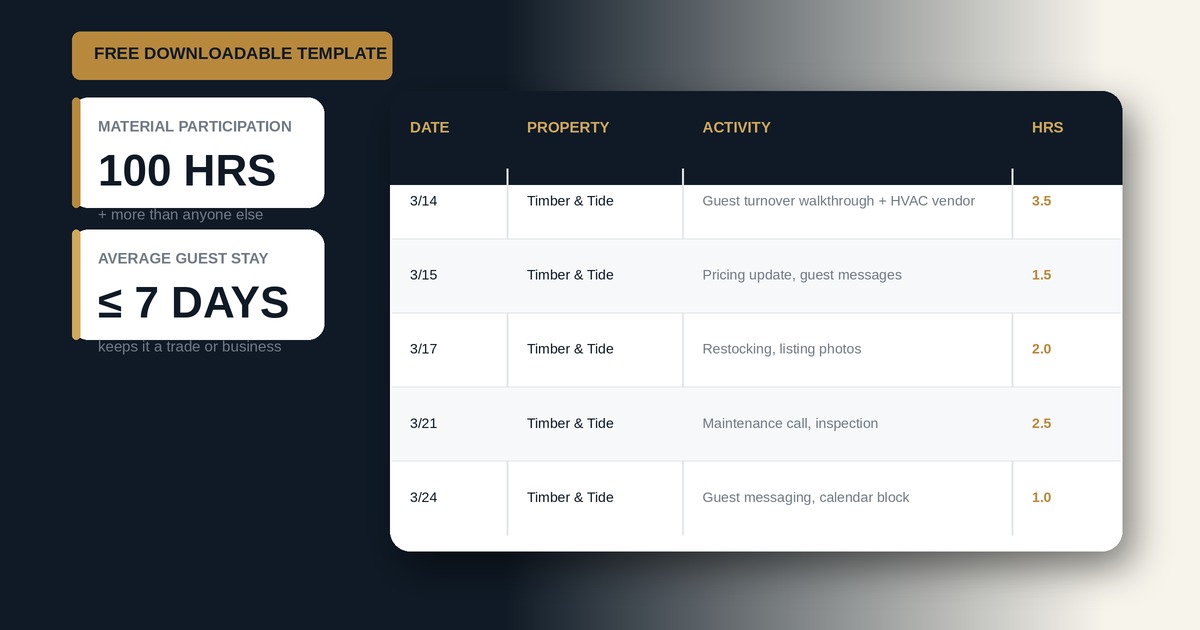
An STR loophole time log is a dated record of the hours you spend running a short-term rental, kept to prove material participation under Treas. Reg. §1.469-1T(e)(3)(ii)(A). When your average guest stay is 7 days or less and you materially participate, your rental losses become nonpassive and can offset W-2 and business income, with no Real Estate Professional Status required.
Grounded in IRC §469 and current Treasury guidance, this guide breaks down exactly what to track and why. You can download the free Excel and Google Sheets template below, or skip the spreadsheet entirely and auto-log from your phone with STR Loophole.
Key Takeaways
- The STR loophole works when two things are true: average guest stay of 7 days or less and material participation. No 750 hours, no REPS.
- You prove material participation with one of two paths: more than 500 hours, or more than 100 hours and more than anyone else.
- Your spouse's hours count toward the test (IRC §469(h)(5)).
- Two gates can still sink you: the 7-day average stay and the 14-day / 10 percent personal-use limit (IRC §280A(d)(1)).
- Cases like Almquist and Penley were lost on bad records, not bad facts. A contemporaneous log is the whole game.
What Is an STR Loophole Time Log?
An STR loophole time log is a running, dated record of every hour you and your spouse put into operating a short-term rental. It exists to document one thing: that you materially participate in the activity under Treas. Reg. §1.469-5T.
That documentation is what converts the strategy from a number on a return into a defensible position. The IRS does not grant nonpassive treatment because you own an Airbnb or feel busy. It grants it because you can show, in writing and kept as you went, that you cleared the tests. A good log captures four things on every line: the date, the property, the specific task, and the hours. Skip the log and you are relying on memory, which is exactly what loses in Tax Court — see the four hour log mistakes that lose in Tax Court.
How Does the STR Loophole Actually Work?
By default, IRC §469 treats every rental as passive, so the losses can only offset passive income. Short-term rentals get a carve-out. Under Treas. Reg. §1.469-1T(e)(3)(ii)(A), when the average period of customer use is 7 days or less, the activity is not a rental activity. It is a trade or business.
That single reclassification is the entire loophole. Because it is no longer a rental, the REPS rules do not apply. You do not need 750 hours. You do not need real estate to be more than half your working time. You only need to materially participate.
Here is how the two strategies differ, because they get confused constantly:
| REPS | STR Loophole | |
|---|---|---|
| Test | 750 hours + more than half your work time | Material participation only |
| Authority | IRC §469(c)(7) | Treas. Reg. §1.469-1T(e)(3)(ii)(A) |
| Key threshold | 750 hours | 7-day average stay |
| Who it fits | Full-time investors, non-working spouses | W-2 earners with a self-managed STR |
| App | repstime.com | strhours.com |
If you are chasing the 750-hour test, that is REPS, and it is a different strategy for a different situation.
What Are the Two Material Participation Paths (100-Hour vs 500-Hour)?
You materially participate if you meet any one of the seven tests in Treas. Reg. §1.469-5T. For a self-managed short-term rental, two of them do the work:
| 500-Hour Path (Test 1) | 100-Hour Path (Test 3) | |
|---|---|---|
| Requirement | More than 500 hours in the activity | More than 100 hours AND more than anyone else |
| Comparison to others? | No | Yes |
| Best for | Owners doing everything themselves | Owners who out-work their cleaner and co-host |
| The catch | It is a lot of hours | If your cleaner logs more than you, you fail |
You only need to clear one — see the full 100 vs. 500-hour comparison for how to decide. Most hosts aim for the 100-hour path because 100 hours is realistic for a single property. The trap is the second half of that test: more than any other individual. If your cleaning company logs 120 hours of turnovers and you logged 110, you lose the 100-hour path and fall back to needing 500. That is why you have to track everyone else's hours too, not just your own.
Do My Spouse's Hours Count Toward Material Participation?
Yes. Under IRC §469(h)(5), a spouse's participation is added to yours for the material participation test, whether or not you file a joint return. If you handle guest messaging and pricing while your spouse handles turnovers and maintenance, both sets of hours combine toward the 100-hour or 500-hour path. Log them separately so you can see each person's contribution — read the full breakdown of how spouse hours work — then let the total do the work.
What Are the Two Gates You Also Have to Clear?
Material participation alone is not enough. Two more conditions have to hold.
Gate 1: average stay of 7 days or less. Divide total nights rented by the number of stays across the full year. Cross 7 and the activity turns back into a rental, and the loophole closes. A few longer monthly bookings can quietly drag your average over the line, so this is a number to watch all year — see how the 7-day rule is calculated — not discover in April.
Gate 2: not a personal residence. Personal use cannot exceed the greater of 14 days or 10 percent of the days rented at fair value (IRC §280A(d)(1)). Go over and the property becomes a personal residence, which caps your deductions. Family stays and nights you let someone stay free or below market count as personal use. Repair days generally do not. Full rules are in the personal use days guide.
What Hours Count Toward Material Participation?
Count the real operating work on the property: guest communication, booking and calendar management, cleaning and turnovers you do yourself, maintenance and repairs, restocking, inspections, vendor coordination, listing and pricing, bookkeeping for the rental, check-in and check-out, and setup or improvements you actively manage. See the complete list of what activities count for the full breakdown.
Do not count general real estate education or podcasts not tied to the property, passively monitoring a rental someone else runs, or, in most cases, travel time. The distinction the IRS draws is between operating a business and being an investor. Running your own Airbnb is a business. Watching a syndication you invested in is not.
Why Does a Contemporaneous Log Beat One You Rebuild in April?
Because that is how these cases get decided. "Contemporaneous" just means you wrote it down when it happened. The regulations let you prove participation by any reasonable means, but the practical reality is one-sided — see why the IRS prefers contemporaneous records over reconstructed ones, whether you're using a spreadsheet or a voice log.
In Almquist v. Commissioner (T.C. Memo. 2014-40), a log created after the fact was dismissed as a "ballpark guesstimate," and a 20 percent accuracy-related penalty followed. In Penley v. Commissioner (T.C. Memo. 2017-65), the records were thrown out for being rounded to the hour with no start and end times. The pattern is consistent — see the full list of hour log mistakes that lose in Tax Court: taxpayers who reconstruct their hours lose, and taxpayers with specific, dated, contemporaneous logs win.
The fix is not to work more. It is to write it down as you go. "Worked on rental, 4 hrs" is weak. "3/14: met the HVAC tech at 412 Oak for an AC quote, walked the unit for the turnover punch list, reset spring pricing, 3.5 hrs" is what actually happened, and it reads that way. For a deeper look at what makes a log defensible, see STR loophole documentation best practices.
Download the Free STR Loophole Time Log Template
The template runs in Microsoft Excel and Google Sheets (open it in Excel, or upload it to Google Drive and open with Sheets). It includes:
- A Start Here tab explaining the loophole, both paths, and both gates in plain English
- A Daily Log with dropdowns and a Taxpayer-versus-Spouse column
- An Other People's Hours tab (dated, with a per-person rollup) so the 100-hour path holds up
- An Average Stay tab that calculates your average guest stay against the 7-day gate
- A Personal Use tab that computes your 14-day / 10 percent limit per property
- A Dashboard that shows the 100-hour and 500-hour paths side by side and gives one yes-or-no read
Download the STR Loophole Time Log Template (Excel / Google Sheets)
Free. No catch. Rename your properties, delete the example rows, and start logging.
How Do You Use the Template? (4 Steps)
- Set up your properties. Rename Property 1, Property 2, and so on to your real addresses on the Lists tab.
- Log daily. Every time you do STR work, add one row: date, property, who did it, activity, a specific description, and hours. The dropdown only offers activities that count.
- Log everyone else. Put your cleaners, co-hosts, and handymen on the Other People's Hours tab with dates, then list each helper once in the rollup so the 100-hour path is defensible.
- Fill the gates and watch the Dashboard. Add bookings on Average Stay and days on Personal Use. The Dashboard tells you where you stand on both paths and both gates in real time.
Why Do Most Hosts Eventually Ditch the Spreadsheet?
Because people stop filling them out. You are disciplined in January, and by March you are rebuilding two weeks of hours from memory on a Sunday night. That reconstructed log is exactly the record the IRS attacks, and it is the most common way a sound strategy gets weakened by weak proof.
That is why we built STR Loophole. It does the logging for you: it syncs with your calendar and your Hospitable account to auto-log hours and pull in real bookings, you can add an entry by voice in a few seconds the moment the work happens, and it timestamps everything. Your average stay, your personal use, and the 100-hour and 500-hour math all update on their own. If you are claiming a meaningful deduction, auto-logged and timestamped beats a spreadsheet you have to remember to open. Start free and keep the template as your backup.
Sources
- IRS Publication 925: Passive Activity and At-Risk Rules — https://www.irs.gov/pub/irs-pdf/p925.pdf
- IRC §469: Passive activity losses and credits limited — https://www.law.cornell.edu/uscode/text/26/469
- Treas. Reg. §1.469-1T(e)(3)(ii)(A): 7-day exception to rental activity — https://www.law.cornell.edu/cfr/text/26/1.469-1T
- Treas. Reg. §1.469-5T: Material participation tests — https://www.law.cornell.edu/cfr/text/26/1.469-5T
- IRC §280A: Personal use of a dwelling unit — https://www.law.cornell.edu/uscode/text/26/280A
- Almquist v. Commissioner, T.C. Memo. 2014-40; Penley v. Commissioner, T.C. Memo. 2017-65
This article is for educational purposes and is not tax or legal advice. Whether the short-term rental rules apply depends on your specific facts and circumstances. Consult a qualified CPA familiar with real estate. STR Loophole is a product of Agents Invest LLC.
The Bottom Line: Download the free template, log every session the day it happens, and track everyone else's hours too. A contemporaneous log is what separates a strategy that survives an audit from one that doesn't.
Ready to see if you qualify? Try the free STR loophole calculator →
Start Tracking Your Hours Today
STR Loophole makes documentation effortless. Sign up free on the web, then log from your desk or the mobile app — everything syncs.